Course and storage limits
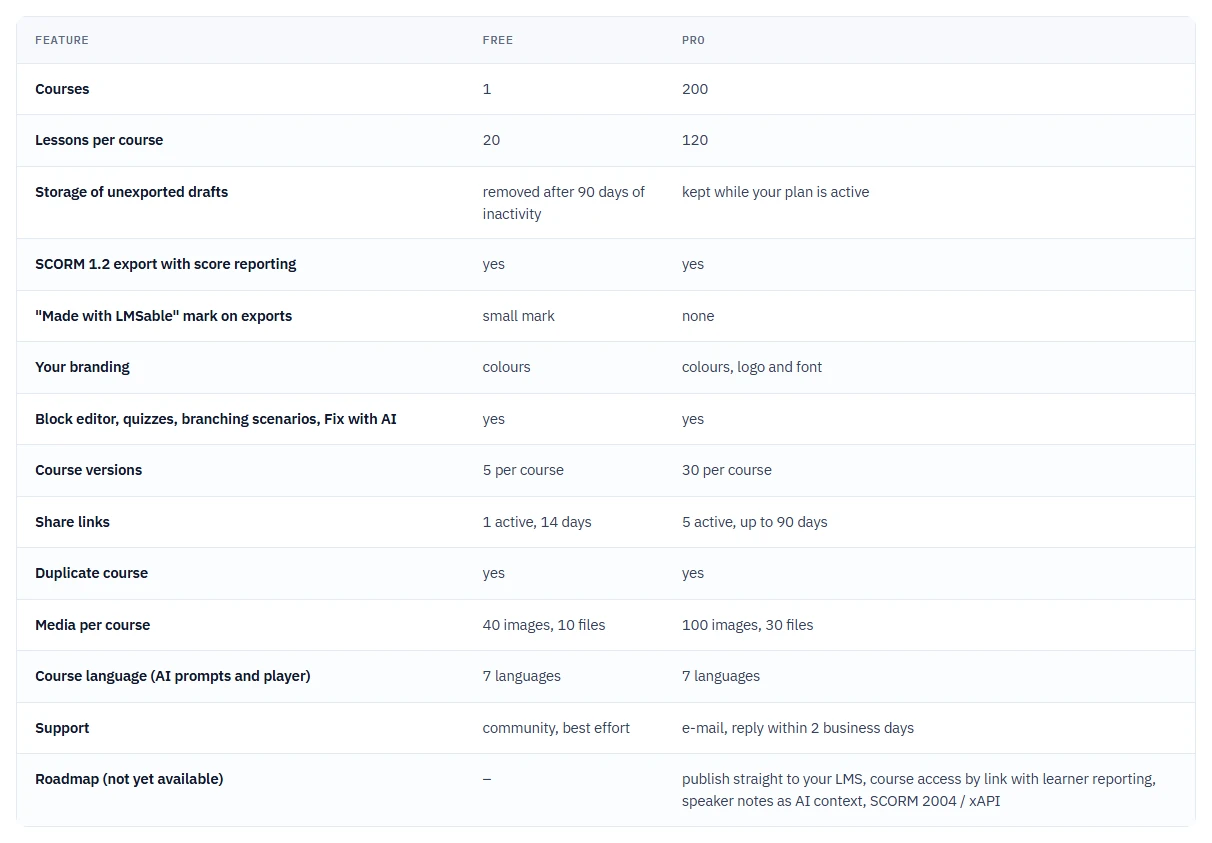
Exact Course Builder limits by plan. See Free and Pro.
Limits by plan
| Limit | Free | Pro |
|---|---|---|
| Courses | 1 | 200 |
| Lessons per course | 20 | 120 |
| Slides per course | 25 | 60 |
| Saved versions (snapshots) per course | 5 | 30 |
| Active review links per course | 1 | 5 |
| Comments per review link | 50 | 200 |
| Review link active for | up to 14 days | up to 90 days |
| Questions per quiz | 12 | 40 |
| Uploaded videos | 1 video, up to 50 MB | 500 MB per course, 5 GB per account |
| AI voice narration | 3,000 characters, one time | 60,000 characters a month |
| Copy a template from the Template Gallery | yes, the copy is your 1 course | yes |
Media (slides, images, PDFs, audio) has its own set of limits, including one allowance per course that covers every upload together - see Images, files and media limits.
If something goes wrong
- "The Free plan includes 1 course. Delete a course or upgrade to Pro to create a new one." or "Limit of projects reached. Delete an old one to create a new one.": delete a course you no longer need (export it first if you want to keep a copy) before creating or duplicating another.
- You cannot add another lesson or slide: the course reached its plan limit. On Free the message reads "The Free plan allows up to 20 lessons per course. Upgrade to Pro to add more." Remove lessons you do not need, for example with Remove empty lessons.
- Your account has more courses than the Free plan allows: one course stays active (the one you chose with Make active, otherwise the one you edited most recently) and the others are marked Archived. You can open, preview, export and delete an archived course, but not edit it. You can change your active course once every 30 days, and upgrading to Pro makes every course active again - see Free and Pro.
- Your active course has more lessons than the Free plan allows: you can still edit and export it. Only lessons beyond 20 per course, new courses, duplicates, template copies and uploads beyond the media limits are blocked.
- A review link will not extend past its active window: you choose how long a link stays active when you create it, up to your plan's maximum, and a link cannot be extended later; create a new link if the old one expired.
Next
See how long a course stays before it is removed: How long we keep your courses.