Save and restore versions
LMSable saves a version of the whole course every time you export, create a review link or update a shared version, unless nothing changed since the last version. You can also save one by hand and restore any version later.
Before you start
At least one lesson has content - a version contains a SCORM package, built the same way as an export. Save a manual version whenever you want a named checkpoint.
Save a version by hand
- On the Export step, find the Versions panel.
- Click Save version.
- Enter a Version name (up to 120 characters, for example "v1.2 sent to client").
- Click Save.
What you should see
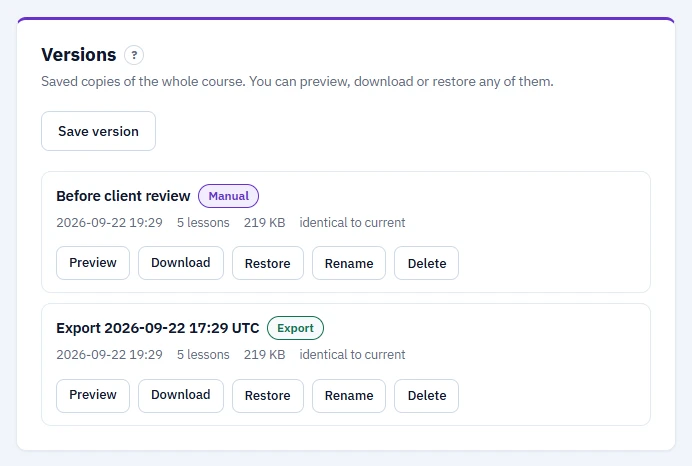
The version appears in the list with a label (Manual, Export, Shared or Backup), the date it was saved, its lesson count, package size, and whether it is identical to the current course or how many lessons differ.
Preview, download or restore a version
- Click Preview to open that version exactly as the LMS will show it. The preview saves no progress.
- Click Download to get its SCORM
.zippackage directly, without rebuilding it. - Click Restore to bring the course back to that version. This replaces the course title, settings and every lesson with the saved ones. LMSable saves the current content as a Backup version first, so you can undo the restore. If the course is already identical to that version, nothing changes.
- Click Rename to change a version's name, or Delete to remove it permanently. Deleting a version also deletes any expired or revoked review links built from it, together with their comments.
Limits
- Today (Pro is not on sale yet), every account can keep up to 30 versions per course. After Pro launches, the Free plan keeps up to 5 and Pro up to 30. See Free and Pro: what is included.
- Up to 1 GB of stored version packages per course.
- When the count limit is reached, LMSable deletes the oldest automatic version (Export, Shared or Backup) to make room. Manual versions and versions used by an active review link are never deleted automatically.
If something goes wrong
- "Version limit reached. Delete an older version first." Every version in the list is a manual one and you are at your plan's limit. Delete a version you no longer need, then save a new one.
- "Storage limit for this project reached. Delete an older version first." Your saved versions together exceed 1 GB. Delete an older one to make room.
- "Revoke the review link first." You tried to delete a version that a review link still points to. Revoke the link in Ask for review, then delete the version.
Next
Share a version with someone for feedback: Ask for review.