H5P Branching Scenario vs SCORM: scoring and reporting
If you want to build a decision simulation for an LMS, two routes come up first. One is H5P Branching Scenario, the open source content type that runs in Moodle, WordPress and other H5P platforms. The other is a branching scenario packaged inside a SCORM course, which any SCORM LMS can run. Both let learners make choices that lead to different scenes and endings. They differ in what a scene can contain, how scoring works, what your LMS learns from each attempt and where the content can run.
This comparison is written by the team behind LMSable, which builds the second kind. We have tried to keep it fair, and we say where H5P is the better choice.
What H5P Branching Scenario is
Branching Scenario is a content type in the H5P library. Instead of a single activity, it chains several pieces of H5P content into a tree. A node can be a Branching Question, which sends the learner down different paths, or a content node: Course Presentation, Interactive Video, Image Hotspots, Video, Image or Text. You build the tree in a full-screen editor in the H5P authoring tool.
A few settings matter for scenario design:
- Scoring has three options: a static score set for each ending, a dynamic score calculated from the learner's answers, or no scoring.
- Navigate back lets learners return to the previous node. It is off by default.
- Required to watch can force learners to finish a content node, such as a video, before they move on.
- Endings can each have their own text, image, feedback and score.
H5P.org announced Branching Scenario as a beta release in early 2019. It is widely used today, but test your exact platform and settings before a large rollout.
What a SCORM branching scenario is
A SCORM branching scenario is a lesson inside a course package. In LMSable, for example, a scenario lesson sits next to text lessons, a quiz and a final test, and the whole course is exported as one SCORM 1.2 package.
Each scene shows a situation, asks one question and offers 2 to 5 answers. A scene can include an image or a YouTube or Vimeo video above the text. Each answer leads to another scene or an ending, loops are allowed, and an answer can carry feedback that the learner sees before the next scene. A scenario can have 2 to 40 scenes and endings in total. The editor has a Graph view that shows every path at once.
There are two modes. In consequences mode, the learner sees where each path leads, and reaching any ending reports 100% to the LMS. That 100% means the learner finished the scenario, not that they chose well: a learner who reaches a negative ending also gets it. If you need to measure the quality of decisions, use scored mode. In scored mode, each answer is worth 0 or 1 point, and the result is the percentage of good decisions on the path the learner took.
Side-by-side comparison
| H5P Branching Scenario | SCORM branching scenario (LMSable) | |
|---|---|---|
| What a node can be | Branching question, Course Presentation, Interactive Video, Image Hotspots, Video, Image, Text | A scene with text, an optional image or video, one question and 2 to 5 answers |
| Scoring | Score per ending, dynamic score from answers (optionally including scores from embedded activities), or none | Consequences (no score) or scored: percentage of good decisions |
| Navigation and revisiting scenes | Learners can go back to the previous node if the author turns on Navigate back (off by default) | No back button for learners; the author can make answers loop back to earlier scenes, and learners can start the scenario again |
| Where it runs | H5P platforms: Moodle's H5P activity, WordPress with the H5P plugin, h5p.com, LTI | Any LMS that imports SCORM 1.2, or as HTML or a link |
| What the LMS receives | A score through H5P's xAPI integration; H5P.com offers detailed reports for Branching Scenario, and detail on other hosts depends on their reporting | A SCORM score and each decision as an interaction marked correct or incorrect, shown where the LMS reports interactions |
| Packaging | One activity; a course can contain several H5P activities, each reported on its own | One lesson inside a course package with text lessons, quizzes and a test, reported as one course result |
| Editing | H5P editor on your platform | Scenario editor in LMSable, by hand or with a draft from your AI chat |
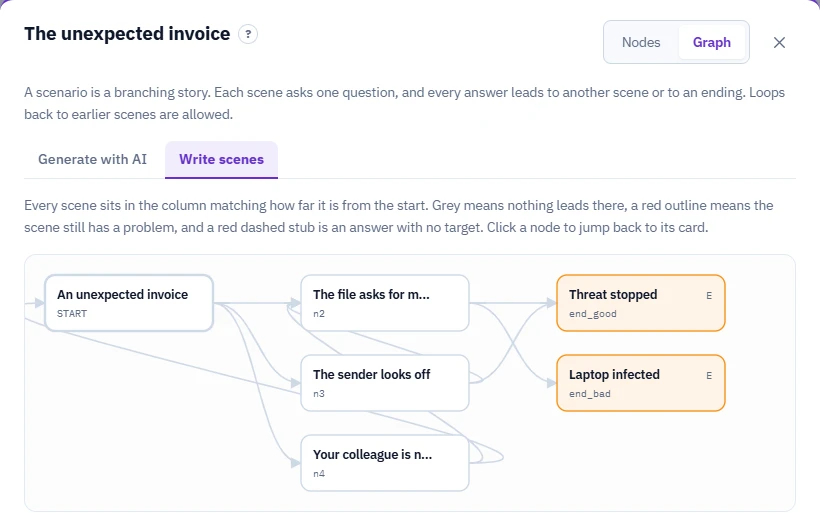
You can play a finished example without an account: a call from fake IT support, where a caller asks you to approve a sign-in request.
Where H5P Branching Scenario is the better choice
- Your platform already runs H5P. If your courses live in Moodle or WordPress and your team knows the H5P editor, adding a Branching Scenario is the shortest path. Nothing has to be exported or uploaded as a package.
- You want rich media inside the branches. A node can be a full Interactive Video or Course Presentation. A SCORM scenario scene is simpler: text, one image or video, and a question.
- You want different scores per ending. H5P can give each ending its own score, which suits scenarios where some outcomes are partially correct.
- You prefer open source content you can edit in place. H5P content stays editable on the platform where it runs.
Where a SCORM scenario is the better choice
- Your LMS is not an H5P platform. Many corporate LMSs import SCORM but not .h5p files. H5P has no official export to SCORM. Some teams use third-party tools for that, but test the result in your LMS, because community reports mention problems with completion status.
- You need decision-level tracking in a SCORM LMS. In a scored LMSable scenario, each decision is reported as a SCORM interaction marked correct or incorrect, where the LMS and its reporting interface support interactions. H5P also offers detailed reporting on supported hosts such as H5P.com, but what you see depends on your H5P host and its reporting setup. See what your LMS will report for the SCORM side.
- The scenario is part of a course. Mandatory training usually needs rules, a quiz and a practice scenario in one completion. In a SCORM course the scenario is one lesson among others, and the course reports one result.
- You want a first draft from your AI chat. LMSable writes a prompt that contains your source material, your AI chat drafts the scenes, and you paste the result back into the editor.
Can AI help you build a branching scenario?
Our free AI H5P generator currently supports 14 H5P activity types, from Course Presentation to Crossword, but not Branching Scenario. For AI-assisted branching scenarios we recommend the scenario lesson in the LMSable Course Builder: your AI chat drafts the scenes from your source material, and you edit and export them as part of a SCORM 1.2 course. See How to create H5P content with ChatGPT for what works with single activities.
How to decide in one minute
Ask two questions:
- Where will learners take it? If the answer is Moodle or WordPress with H5P, start with H5P Branching Scenario. If it is any other LMS, a SCORM package is the safer format.
- What do you need to know afterwards? If a score is enough, both work. If you want to see where people chose wrong, use a scored SCORM scenario and check what your LMS shows for interactions.
Try a branching scenario
You can play finished scenarios without an account in our course templates, for example a call from fake IT support or an email sent to the wrong person. To build your own, see build a branching scenario in the Help Center.
Build a branching scenario for free in our SCORM authoring tool. The Free plan includes one course with up to 20 lessons and SCORM 1.2 export.
FAQ
Can I put an H5P Branching Scenario inside a SCORM course?
Not directly. An .h5p file needs an H5P player, which a SCORM LMS does not provide. You would either convert it with a third-party tool or rebuild the scenario as a SCORM lesson.
Does Moodle support H5P Branching Scenario?
Moodle has a built-in H5P activity since version 3.9, so you can add a Branching Scenario .h5p file there, as long as the content type's libraries are available on your site. If Moodle reports a missing library, see how to fix an H5P missing required library error. Check which details the attempts report shows on your Moodle version.
Which is easier to maintain?
H5P content is edited where it runs, so small changes are quick. A SCORM scenario is edited in the authoring tool and exported again, but the course keeps its lessons, quiz and scenario together, which helps when a policy changes.